

We're excited to announce that you can now run Greenbone's enterprise OpenVAS scanner against your internet-facing targets (with private networks scanning coming soon).
About Greenbone OpenVAS
Greenbone develops OpenVAS, one of the world's most widely used open source vulnerability scanner.
How the engine and the feed work
OpenVAS has two parts: the scanning engine and the feed. The engine does the work of a scan. It discovers each target's open ports, services and software versions, then runs the vulnerability tests that match what it found.
The feed is where those tests come from. Each test is a small script that defines one check: what to probe and what response means the target is vulnerable. The engine has no built-in knowledge of vulnerabilities, so what a scan can find is set entirely by the feed it runs.
That is why the enterprise feed matters. It builds on the free community feed with tests for enterprise software and network gear from vendors such as Cisco, Microsoft Exchange and Palo Alto Networks, compliance checks against CIS Benchmarks, and EPSS-based prioritization. Greenbone updates it continuously, so new vulnerabilities are covered as they are disclosed.
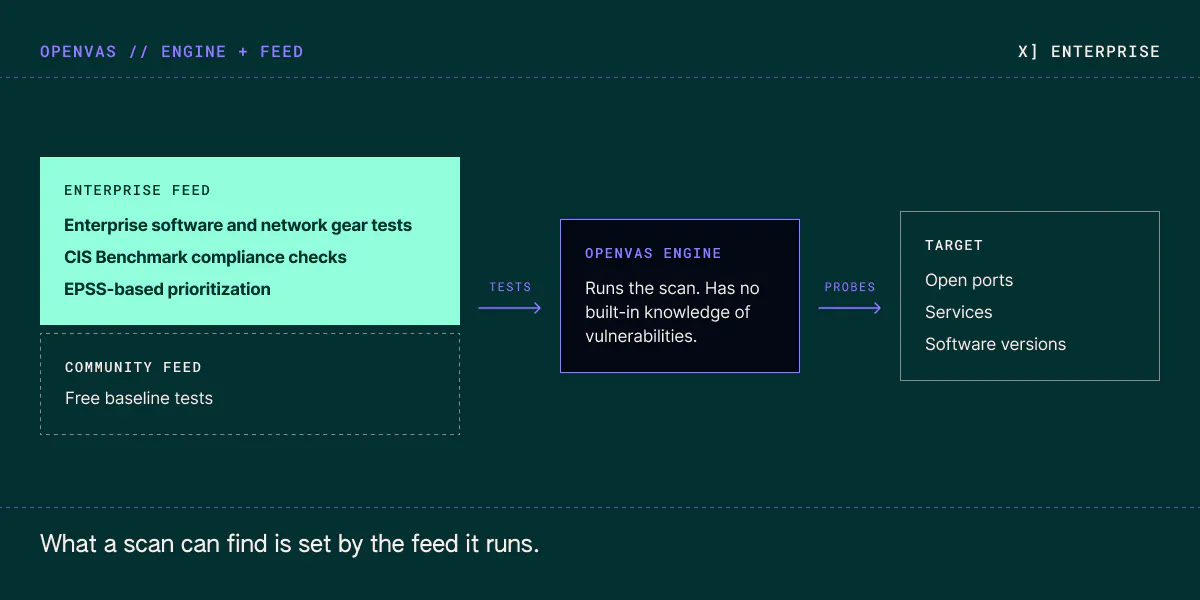
Diagram of how OpenVAS works. On the left, the enterprise feed sits on top of the community feed and adds enterprise software and network gear tests, CIS Benchmark compliance checks and EPSS-based prioritization. The feed sends tests to the OpenVAS engine in the middle, which probes the target’s open ports, services and software versions on the right. Caption: “What a scan can find is set by the feed it runs.”
Why run Greenbone through HostedScan
- One dashboard for every scanner. Greenbone findings sit next to your Nessus, web application and TLS results, with one risk list across all of them.
- No appliance to run. There is no Greenbone appliance or virtual machine to size, patch or license. The agent installs with one command and keeps its scanner images up to date with each release.
- Scheduling and alerts. Run scans daily, weekly or monthly, and get notified by email, Slack or webhook when new risks appear.
- Risk tracking and reports. Follow each finding from discovery to fix, and export PDF, CSV or JSON reports for clients and auditors.
Start scanning with Greenbone
Greenbone scanning is available on Professional plans and above. See our pricing page to get started today, or request a quote for high-volume or custom needs.
Speed and power,
without the complexity
The world's leading vulnerability scanners, all in one platform.